TEAM SOLUTIONS
WORKFLOW SOLUTIONS
REVIEW TOOL
PROJECT MANAGEMENT
TOOLS & INTEGRATIONS
TEAM SOLUTIONS
WORKFLOW SOLUTIONS
<!–
–>
<!–
–>
REVIEW TOOL
PROJECT MANAGEMENT
TOOLS & INTEGRATIONS
A modern, flexible alternative for teams who want more control over their integration.
A simple, reliable and widely supported way to integrate Approval Studio into your software.
Automate and scale your Approval Studio workflows with MCP, designed for seamless enterprise-level integration.
Create, read, update, delete projects. Get proof reports. Change statuses.
Integrate with ERP and project management tools (Jira, Asana)
Upload, get info, delete, download, report, compare version metadata.
With DAM, PIM, cloud storage, and version control pipelines
Read, hide, resolve/unresolve, delete annotations on assets.
With quality control dashboards and reporting tools
Create, view, complete, delete review tasks. Assign them to users.
With project management and workflow automation
List tenants and users. Manage team access programmatically.
With HR systems, SSO provisioning, and onboarding tools
Subscribe to key events and track uploads, annotations, task, etc.
With Slack alerts, email triggers, and ERP sync
REST API Integration Use Cases for Design Review
Solution: A webhook in the DAM triggers a POST to /assets/{id}/versions whenever a new master file is saved. The artwork lands in Approval Studio automatically, a review task is assigned to the artwork manager, and the team is notified via Slack — all within seconds of the file being saved.
Packaging Team
Industry: FMCG / pharma
Problem: Every new artwork version requires a manual download and re-upload into Approval Studio.
Solution: The PIM creates a new Approval Studio project via POST /projects for each SKU requiring label sign-off. The approval status is synced back to the PIM via the asset.approved webhook. The full proof report (GET /projects/{id}) is stored in the PIM as compliance documentation.
Company with a PIM system
Industry: Retail & Manufacturing
Problem: Label approvals tracked in spreadsheets leave no audit trail and can lead to missed deadlines.
Solution: A Jira automation triggers the Approval Studio REST API: creates a project, uploads the latest asset from the cloud storage link in the Jira ticket, assigns a review task to the account manager. The reviewer gets an email instantly and can open the review tool without touching Jira.
In-house Creative Team
Industry: Marketing
Problem: A "Ready for Review" Jira task still requires manually setting up the review in Approval Studio.
Solution: A custom internal dashboard polls GET /projects and GET /assets/{id}/annotations to display live status across all projects. Color-coded rows show: green (approved), amber (in review), red (change requested). Clicking a row opens the Approval Studio review tool via direct link.
Studio Operations Manager
Industry: Print-on-demand
Problem: Tracking approval status across all the projects requires logging into Approval Studio manually.
Solution: Register the Slack incoming webhook URL as an Approval Studio webhook endpoint subscribed to asset.approved and asset.rejected events. Every decision is posted to the relevant Slack channel within seconds, with the asset name, reviewer name, and a direct link to the review.
Design & Review Team
Industry: Slack / Teams Notification System
Problem: Designers only learn artwork was approved/rejected when they next log in (often hours later).
Solution: A webhook in the DAM triggers a POST to /assets/{id}/versions whenever a new master file is saved. The artwork lands in Approval Studio automatically, a review task is assigned to the artwork manager, and the team is notified via Slack — all within seconds of the file being saved.
Industry: FMCG / pharma
Problem: Every new artwork version requires a manual download and re-upload into Approval Studio.
Solution: The PIM creates a new Approval Studio project via POST /projects for each SKU requiring label sign-off. The approval status is synced back to the PIM via the asset.approved webhook. The full proof report (GET /projects/{id}) is stored in the PIM as compliance documentation.
Industry: Retail & Manufacturing
Problem: Every new artwork version requires a manual download and re-upload into Approval Studio.
Solution: A Jira automation triggers the Approval Studio REST API: creates a project, uploads the latest asset from the cloud storage link in the Jira ticket, assigns a review task to the account manager. The reviewer gets an email instantly and can open the review tool without touching Jira.
Industry: Marketing
Problem: A "Ready for Review" Jira task still requires manually setting up the review in Approval Studio.
Solution: A custom internal dashboard polls GET /projects and GET /assets/{id}/annotations to display live status across all projects. Color-coded rows show: green (approved), amber (in review), red (change requested). Clicking a row opens the Approval Studio review tool via direct link.
Industry: Print-on-demand
Problem: Tracking approval status across all the projects requires logging into Approval Studio manually.
Solution: Register the Slack incoming webhook URL as an Approval Studio webhook endpoint subscribed to asset.approved and asset.rejected events. Every decision is posted to the relevant Slack channel within seconds, with the asset name, reviewer name, and a direct link to the review.
Industry: Slack / Teams Notification System
Problem: Designers only learn artwork was approved/rejected when they next log in (often hours later).
REST API version v1.33 (4-2-2026)
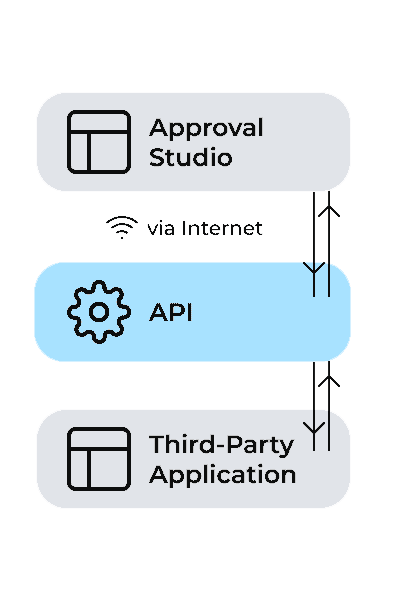
Incorporating multiple software solutions into one system helps achieve a consistent, organized workflow. Approval Studio API makes sure the integrations work smoothly with your approval process. For even greater flexibility
API access is available on Pro, Pro XL, and Enterprise plans. Starter plan users can request API access by contacting support.
All formats that Approval Studio supports. File size limits match your plan’s storage limits.
Currently, assets are uploaded one at a time via POST /assets. For bulk upload workflows, we recommend scripting sequential requests. Enterprise clients can contact us for dedicated bulk upload support.
The REST API is the stable, production-ready API with the widest feature coverage. The GraphQL API allows more flexible queries (fetch exactly the fields you need in one request) and is ideal for complex integrations, dashboards, and read-heavy use cases. See the GraphQL API page for details.
There is no sandbox environment; all API calls affect live data. We recommend using read-only requests to safely test the API: all GET requests are safe.